Turkishtime, one of Turkey’s most important reference sources on business and economics, presents a comprehensive research every year, ranking the companies that give the most importance to R&D investments. This research traces the investments made in innovation and technology in Turkey and identifies the companies that shape the future. As PEAKUP, we are proud to be among the top 250 companies that spend the most on R&D in Turkey in 2023, according to the results of this research conducted by Turkishtime.
As a platform that closely follows the changing dynamics and new trends of the business world, Turkishtime takes a broad perspective on these rankings. In a period where digital transformation and innovation are becoming more and more important every single day, the R&D investments we make at PEAKUP form the basis of the solutions we offer to our customers. The steps we take in the field of R&D draw a roadmap not only for today, but also for the business world of the future.
This success is a reflection of the importance PEAKUP attributes to innovation and technology. With the contributions of all our colleagues and the trust of our customers, we will continue to reach even greater goals in this field. We will continue to invest in Turkey’s future with our R&D activities and to prepare the society for the future with technology at full speed.
The world of technology and artificial intelligence continues to develop rapidly. With these developments, organizations are accelerating the actions taken to integrate artificial intelligence solutions into their business processes and increase efficiency.
As PEAKUP, we closely follow the latest developments and support the transformation of organizations by meeting their needs with our versatile artificial intelligence solutions. With our Artificial Intelligence Business Unit, we provide artificial intelligence consultancy and trainings to organizations and develop artificial intelligence solutions that organizations need.
In this post, we will take a closer look at our artificial intelligence training process with P.I. Works and discuss the general outputs of our collaboration. First, let’s get to know P.I. Works better.
P.I. Works
P.I. Works is a technology company providing AI-driven and automated network management solutions globally with an award-winning product portfolio and field-proven service expertise. P.I. Works aims to provide operators with efficient and cost-effective solutions to design, optimize and automate their networks to deliver exceptional subscriber experience, and plays a fundamental role in the development of key mobile network standards.
P.I. Works crowns these missions with artificial intelligence solutions and designs a better experience for its customers. The Artificial Intelligence Training organized with our PEAKUP Artificial Intelligence Business Unit is one of the trainings organized in this regard.
Scope of the Training
The 3-day training focused on Microsoft Copilot and Azure AI technologies. During the training, we discussed both the theoretical knowledge of the technologies and conducted hands-on examples by practicing on these technologies.
Day 1: The basics of Copilot, areas of use, and integration processes were covered. Participants had the opportunity to experience live how to integrate Copilot into their business processes.
Day 2: Various components of the Azure AI platform were introduced. Participants gained experience using the solutions and tools offered by Azure AI.
Day 3: We reviewed and strengthened what we learned in the first two days with live demos. Participants had the opportunity to put what they learned into practice by developing projects based on real-world scenarios.
Orhan Altan, Digital Transformation Manager at P.I. Works, commented on this training with PEAKUP as follows: “We have been working with PEAKUP for a long time and we are very happy with this collaboration. It was very valuable for us to receive training from PEAKUP to improve our Digital Transformation department. We would like to thank everyone who contributed to this valuable training.”
With this training, the P.I. Works Digital Transformation Team had the opportunity to get to know Copilot and Azure AI technologies better. P.I. Works’ mission to advance digital transformation in internal processes became enriched with artificial intelligence technologies.
As PEAKUP, we will continue to be with our customers in their technology and artificial intelligence adventure, and we will accompany their transformation as the closest supporter of the process.
We will continue to design the future from today with our training and consultancy services and customized artificial intelligence solutions.
Artificial intelligence news continues to increase its place on the agenda day by day. What are the features of ChatGPT-4o? Which artificial intelligence features has Google introduced? What kind of updates have been made in Microsoft Artificial Intelligence Solutions? And many more questions are closely followed by technology enthusiasts.
As PEAKUP, we bring you our TECHUP newsletter every week to answer your questions and keep you up to date with technological developments. You can access all issues of the newsletter here and follow the world of technology and artificial intelligence closely.
Today, we will answer one of the most frequently asked questions and talk about the highlights of the Microsoft Build 2024 event. What is Microsoft Build event? What features have been added to Copilot? How to ensure security in artificial intelligence? Let’s explore all of them in detail.
What is Microsoft Build? When and where does it take place?
Microsoft Build, one of Microsoft’s biggest events that brings together developers, software engineers and IT professionals, took place in Seattle on May 21-23 this year. The event was broadcasted in real time on online platforms, bringing together participants from all over the world.
Microsoft Build 2024: Welcome to the age of AI transformation
A stream of events was planned for days full of inspiration, discussing new updates and the latest developments, as well as case studies with world leaders. So how do you think this great event started? Let’s just watch it. 👇
The event kicked off with this striking video, where leading names in the industry such as Microsoft CEO Satya Nadella, Kevin Scott, Scott Guthrie and others held sessions introducing the developments. In addition to these sessions;
Live meetings have been planned where participants can meet with Microsoft’s expert staff.
Participants were able to watch the sessions they had missed.
Competitions have been organized where developers and students from around the world could participate.
With Microsoft Learn, participants were able to receive certificates by completing the necessary steps.
So, which topics were covered in these jam-packed days? Let’s take a brief look 👀
Microsoft Build 2024 Important Topics
1. Team Copilot
What if we could instantly add a new teammate to every team? What if that teammate could attend meetings, comment on the meeting, summarize the meeting, or even completely manage a project? Yes, Team Copilot offers you all these features and more.
Copilot now goes beyond being a personal assistant and acts as a true teammate. Commands given in all areas integrated with Team Copilot (e.g. Teams, Planner, Loop, etc.) get directly executed by Copilot.
Now, with this feature, after determining all the details of a project, you can ask Copilot for tasks such as tracking the stages of the project and informing the team members regarding the deadlines. 👇
2. Agents: Custom Copilot
As we discussed in the previous section, Copilot now goes beyond being a personal assistant and acts as your team’s assistant or even teammate, easily representing you when working with third parties.
For example, when you are looking for a supplier, Copilot can receive offers and details from the supplier and help you make the right decision by evaluating all options. Copilot also takes part in the e-mail processes with suppliers or purchasing managers.
Designing the digital assistant that will take part in all these stages becomes much easier and possible thanks to the unique capabilities of Copilot Studio. 👇
3. Copilot in SharePoint
Using SharePoint is becoming much more functional for employees. Users can access the information they need in seconds with Copilot, and of course, the data is retrieved from SharePoint and OneDrive – of course from the files they have access to – Co-pilots specially designed for organizations can be easily implemented with Copilot Studio, we can say that it is perfect for those who want to increase productivity. 👇
4. Copilot Extensions and Copilot Connectors
With Copilot’s new extensions, a more personalized experience is now possible, increasing efficiency in business processes. The new Copilot extensions make it easier for everyone to customize their actions and access data across their business processes.
In addition, with new developments, custom designed Copilots meet with users through the platforms they can integrate with. For example, what if we tell you that a Chatbot designed specifically for your organization can communicate directly with your customers or employees via WhatsApp?
5. Copilot Studio
With the renewed Copilot Studio, it is now much easier to produce customized copilots. It is easier, more possible and faster to design a special Copilot to be used in SharePoint, to design a Copilot that will take part in processes carried out with 3rd parties and to design the Copilot needed in many more special categories. At the same time, remember that Copilot is constantly improving with feedback and you are always in control.
6. Real-Time Modal GPT-4o
GPT-4o, recently introduced by OpenAI, is now generally available through the Azure OpenAI Service. Let’s pause here and take a deep breath to imagine what this development could lead to.
GPT-4o, which analyzes text, image and voice capabilities in real time and can combine all of them, will enable companies to use groundbreaking innovations in the world of artificial intelligence.
Let’s watch an example of how it reflects in our daily lives. 👇
For more detailed explanations and different examples, you can take a look at the introduction below.
Security in Artificial Intelligence
Apart from new developments, another focus of the event was on how to ensure security in artificial intelligence. It was announced that extra defenses against data leaks and security vulnerabilities are being developed with new services on different platforms.
For example, with Microsoft Edge developments, it was shared that the ability to take screenshots on pages labeled as sensitive and protected is blocked, providing protection against data leakage in the browser, while at the same time allowing IT administrators to see which devices are at risk. In addition, it was announced that responsible artificial intelligence solutions were also increased.
Here is a session where details about security were shared:
The details of the Microsoft Build event are endless. However, we still briefly explored the highlights of the event together. Let’s watch the important topics with Microsoft’s summary. 👇
We have covered the most important topics of the Microsoft Build event. What if we tell you that all these features are presented to you in a studio and the most accurate artificial intelligence for your company is created by a team of experts who say “wish anything from me’”?
With the expert team of PEAKUP Artificial Intelligence Unit and sample use cases, this story is coming true. Stay tuned to our social media accounts for more detailed explanations and to experience Microsoft Artificial Intelligence Solutions with the expertise of PEAKUP.
AI Builder is an artificial intelligence service offered by Microsoft, designed to reduce the errors and time loss. AI builder can be used by all departments of your business. This service comes with a large number of trained artificial intelligence models. With these models, you can;
Read business cards
Identify texts
Make predictions
Detect and translate languages (using different Microsoft cloud services)
Process documents
Extract key phrases
Categorize
Detect objects
Analyze the feelings of the other party from an incoming e-mail or message.
By using predictive analytics for your organization’s Human Resources Department, you can evaluate the suitability of potential candidates for the job, predict the need for maintenance by monitoring the historical and production data of our production equipment, and ensure that the information in recipes or manually filled documents is sent to the areas you request to be transferred.
In addition, for your finance/accounting department, the information on receipts and invoices can be automatically registered in a desired field and incoming invoices can be automatically saved in your database. In addition, with the identity recognition technology, the identification required for your department’s bank transactions can be filed automatically. More importantly, you can maximize security by precisely detecting the accuracy of incoming ID cards.
We can separate and save complex folders into new files by naming them as desired according to the information in them. Not only that, it is also possible to be instantly informed about positive/negative comments about your company on social media. It is important to remember that Power Automate will be our biggest supporter to speed up business processes and minimize errors made by users.
You can use existing models for these processes, or you may need to train custom models for your own system and data. So how can you train the model? You can use the existing service on the screen that appears after selecting the model, or you can start using it after specifying your table, data, text, visual fields specifically as you wish with the custom model option. The only thing you need to do for this is to match the fields you define with the visual/document or text fields.
For example, if you want to detect an object, you will need to select the field you had defined in the first step in the image and match it that way, if the invoice information is to be scanned, you will need to teach it by matching the fields such as “product name”, “invoice name” that you have previously opened on the document. If you are working for objects, you need to load a minimum of 15 sample data for each object while training the model, or a minimum of 5 sample invoices if you are working on invoices. You can see these criteria in writing during the training phase and you can improve the model performance by making the correct definitions with different scenarios that may occur thanks to these suggestions.
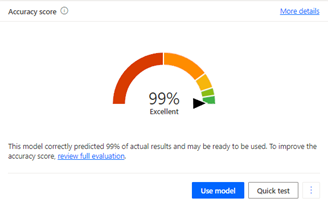
Once the model training is complete and you see the model “accuracy score”, if you do not think there is an area that needs to be revisited, it is possible to publish it by performing the test. Afterwards, you can connect the model you have trained to Power Automate or Power Apps and analyze it within the application, you can fill in a form directly with the scanned information.
Another important issue here is to set the definitions and triggers correctly and to foresee all possible ways the process can work. For this reason, a correct analysis will not cause repetition.
Even if you cannot access real data to experiment with them, you can access the sample packages offered by Microsoft here and start working with sample data for object detection, prediction, category classification, document processing, business card scanner models.
In this post, we talked about the AI Builder application that you can use in your business processes.
Don’t forget to contact us for the flows you want to automate and all your processes you want to digitize!
We crowned our achievements with an important award in the Export Boosters Competition organized by the Service Exporters’ Association as part of the Mobilefest Technology Fair and Conference held at the Istanbul Congress Center between April 25-27. In the award ceremony, which consisted of 2 different main categories and 12 different sub-categories in total, PEAKUP was deemed worthy of the first prize in the “Agility in IT Services” category for Technology Providing Companies.
In the program, which was organized to encourage technology innovation in Turkey and to reward valuable institutions serving in this field, many valuable institutions were recognized with valuable awards. We would like to express our endless gratitude to all our employees, customers and stakeholders who helped us return from this special night of intense competition with a gold award. At the same time, we would like to express our respect to the esteemed jury members who deemed us worthy of this award and to everyone who contributed to the organization.
With this prestigious award, we are happy to have been recognized for the value we give to technological innovation and our services in this field. We aim to build a more agile and efficient future with our innovative approach and services that add value to our customers’ business processes. We will continue to optimize business processes and increase competitive advantage with the solutions we offer to our customers.
Have you been working with Power Platform technologies for a while and are now having a hard time keeping track of your applications?
Did you know that there is a tool that allows you to control all your applications, developer accounts, security rules, database, reporting, and determine your next strategies?
What is CoE Starter Kit?
Center of Excellence is a tool designed to control the Power Platform network within the company and increase efficiency.
Center of Excellence is basically designed to encourage innovation and improvement.
CoE is a hub of multiple tools to support your company’s strategy for adopting and using Microsoft Power Platform technologies.
How do we start using the CoE Starter Kit?
Set up the CoE Starter Kit – Power Platform , Microsoft Learn has all the steps to set up the CoE Starter Kit. You can do the installation by following the steps at this address. In the meantime, we recommend that you install from an account with admin privileges and get support from your IT specialist.
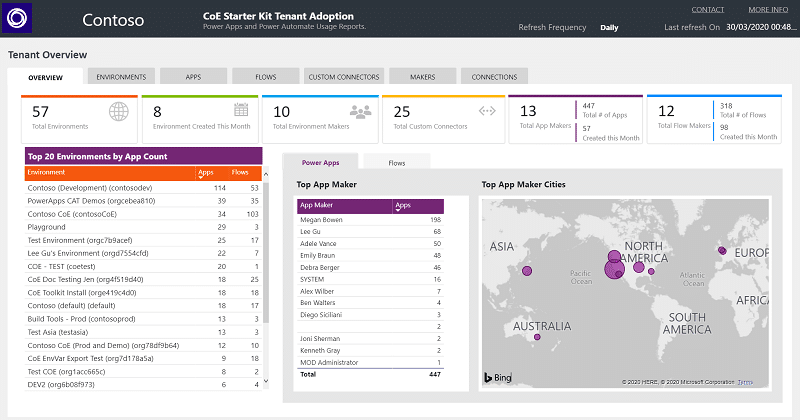
Once you have installed it, you can open the Power BI panel from CoE Starter Kit and access all the applications, environments, flows, etc. developed within the company.
When you complete the relevant settings, the following administration panel will be displayed.
You can change the owners of the applications developed by the employees who have left the company and make your old applications functional again.
You can determine your security strategy and ensure that people in the environment are assigned to the necessary roles.
You can perform license optimization.
You can develop a strategy to take your application developers to the next level and increase development with internal events to motivate new developers.
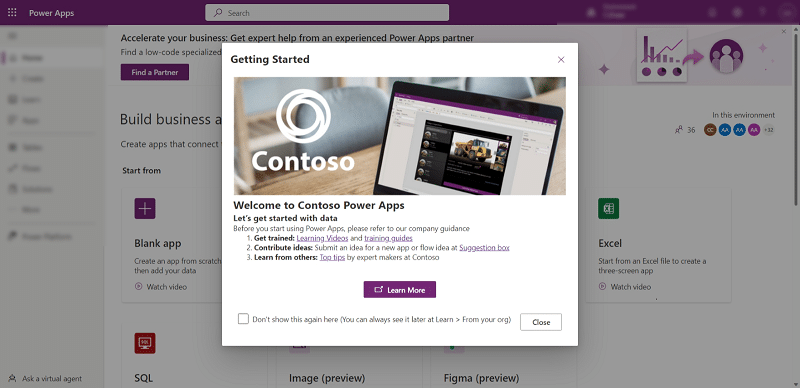
You can prepare a welcome content for new users in your environments.
Maker Welcome
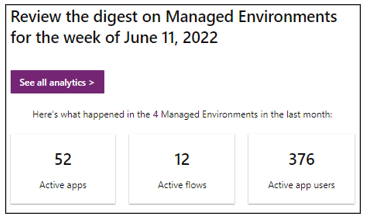
With weekly summary reports, you can keep system administrators up to date about usage information in the environment.
Usage Insight
You can manage your data policies and prevent data loss or private data sharing.
Sustainability means meeting current needs without compromising the ability of future generations to meet their own needs. Developing sustainable practices is crucial when it comes to addressing climate change, reducing environmental pollution and building a more fair and sustainable world.
Sustainable business practices encourage innovation and create new opportunities for economic growth. They enable companies to stay ahead of the curve and capitalize on emerging trends.
Power Apps is a platform that allows users to create custom applications and workflows that meet their organization’s specific needs, making it a flexible and customizable solution for sustainability initiatives.
This platform allows users to quickly create customized business applications, enabling solution-oriented and sustainable steps to be taken in the field in a short time, aiming to positively impact the environment, society and economy.
In this regard, there are several ways to support Power Apps’ sustainability goals:
Data Monitoring and Reporting: Power Apps saves time with its data tracking and reporting capabilities and sustainability performance. Offers the opportunity for efficient planning by creating applications for tracking environmental impacts, energy consumption, waste amount and other sustainability indicators.
Productivity and Working Without Paper: Power Apps increases efficiency by reducing paper usage and optimizing digital processes. Digitizing forms, approval flows and other processes reduces paper consumption and thus helps conserve resources.
Energy and Resource Savings: Digitizing and automating business processes with Power Apps reduces energy and resource use. For example, by using automated data integration instead of manual data entry, you get to save time and energy.
Increasing Sustainability Awareness: Power Apps can be used to increase employee and user awareness of sustainability goals. For example, you can develop training or awareness applications.
So where are we at with Power Apps and sustainability?
Let’s take a look at the applications we have developed and see for ourselves.
Our Field Visit Application: Provides sustainability advantages for our colleagues who take an active role in the field in terms of using time efficiently, preventing paper waste, fast reporting, and using data in more than one area.
Inventory Application: Supports sustainability with its user-friendly interface design, where all end-to-end inventories within the organization are recorded, at the same time, the embezzled inventories are displayed, the inventory is assigned to the employee, detailed tracking of the inventory status is provided, and while performing all these operations, it can be run on all devices, including mobile devices, and accelerates the processes while alleviating the workload on the person or department.
Our IT Helpdesk Application: Provides communication between departments through the chat within the application, taking into account time, energy and resource savings, and also provides great support in accessibility and communication issues by tracking the status of the opened request, adding documents to the request and keeping it hidden.
Our Flows: We can customize and integrate the notification of our special days, birthdays of our colleagues, current exchange rate values, multi-approved workflows, reading invoices/documents etc. from websites and outputting them to the specified source to many platforms, while saving manpower, reducing the workload with sustainable flows and saving time.
Combining sustainability practices with the power of Power Apps accelerates innovative and meaningful change in organizations of all sizes. With a variety of features and tools at your fingertips, we combine our apps with your dreams to build a better and more sustainable future.
The E-Turquality (Stars of Informatics) Program aims to develop Turkey’s informatics and sub-sectors, encourage innovation and create regional and global unicorns that can compete in international markets. The E-Turquality (Stars of Informatics) Program, which includes new support elements specific to the IT sector, has been designed to support companies with high added value in all IT and sub-sectors.
✓ Moving away from the focus on brands, IT sector services/products have been placed at the center of the support model.
✓ The inclusion and pre-examination processes of companies and the criteria for inclusion have been revised in line with the dynamics of the IT sector.
✓ In order for companies to strengthen their corporate capacities and grow abroad within a strategic plan, an annual strategic business plan has been made mandatory and service procurement for this purpose has been included in the scope of support.
✓ An annual monitoring and evaluation system was introduced to monitor the effective and efficient use of the support.
PEAKUP has been the 15th company to be accepted to E-Turquality.
🚀 We would like to thank our entire team for being with us in achieving this great success. 🙌 We are proud to join the E-Turquality program and will continue to be Turkey’s rising star in technology.
For over 30 years, The Legal 500 has been analyzing law firms and in-house counsel around the world to identify the world’s ‘Most Effective and Best Legal Counsel’.
In recent years, many companies have experienced a rise in their in-house numbers as they recognize the potential value that can be derived from their legal departments and the importance of nurturing internal expertise. Since 2013, The Legal 500 has played a vital role in acknowledging and honoring the in-house lawyers who actively propel businesses forward.
The GC Powerlist comprises a range of publications, events, and networking opportunities specifically designed to showcase the most influential in-house lawyers and legal teams operating within today’s business landscape.
Law firm partners and in-house counsel are cordially invited to nominate exceptional in-house lawyers who have demonstrated instrumental contributions in the following areas:
Effectively influencing or shaping opinions within their respective companies or industries.
Developing ingenious technical solutions to tackle complex issues.
Establishing innovative structures that enable the in-house function to drive business outcomes.
Providing a business working model that serves as a benchmark for other corporate counsel to follow.
As PEAKUP, we are proud to announce that our legal counsel, Attorney Demet Ceylan Demircan, has been selected among the most influential legal counsels in the Legal 500 2023 list and included in the GC Powerlist. We wish her many successes. 💼🌟
Automating business processes is extremely important when it comes to increasing efficiency and saving time. Therefore, automating your business processes using Power Apps can boost your business’ competitive advantage. In this post, I will talk about 5 Power Apps applications that you can create to automate your business processes. Let’s take a look!
Recruitment Application: You can help your business save time and money by automating the process of hiring new staff. This app covers everything from posting recruitment ads, reviewing and evaluating CVs, scheduling interviews and making the hiring decision. Field Operations Application: This application is designed to facilitate and accelerate the work processes of field operations personnel. It enables staff to access and update customer information and order details while working in the field. Sales Management Application: Designed to make the customer management and sales process more effective for sales teams. This app allows you to track and manage customer information and sales opportunities.
Business Analytics Application: You can use this app to collect, analyze and report your business data. This app will help you monitor your business performance and make decisions.
Employee Operations Application: This app will help you improve the efficiency of your business by automating your employees’ processes. For example, this app will allow you to manage your staff’s leave requests, conduct performance evaluations, and streamline reporting.
Power Apps
Power Apps is a powerful platform that helps businesses automate their business processes and make them more efficient. The five app ideas mentioned above are designed to address the different needs of businesses and can be easily created using Power Apps.
Implementing these apps in your business will help automate business processes and make them more efficient, fast and error-free. In addition, the use of these apps saves your staff time by preventing them from wasting more time and energy.
Finally, building such applications using Power Apps does not require programming knowledge. Therefore, even a non-technical business owner can benefit from Power Apps to automate business processes.
If you would like to get Power Apps consultancy from us, don’t hesitate to contact us. Don’t forget to follow our blog page to stay up to date with what’s new, check out the Microsoft world and learn how to meet your different business needs.